

Embark on a journey to upgrade your legacy AT&T Digital Life equipment with this detailed guide. Explore the key components, compatibility checks, step-by-step upgrade process, and troubleshooting tips to ensure a smooth transition.
Overview of Legacy AT&T Digital Life Equipment
Legacy AT&T Digital Life equipment consists of essential components that form a comprehensive security and home automation system. These components are designed to provide users with peace of mind and convenience in managing their homes.
Key Components of Legacy AT&T Digital Life Equipment:
- Control Panel: The central hub that allows users to arm/disarm the system, receive alerts, and control various features remotely.
- Door and Window Sensors: Detect openings and trigger alarms when unauthorized entry is detected.
- Motion Sensors: Detect motion inside the home and can trigger alarms if movement is detected when the system is armed.
- Security Cameras: Provide live video feed and recording capabilities for monitoring activities in and around the home.
- Smart Door Locks: Allow for keyless entry and remote locking/unlocking of doors.
Functionalities and Features of Legacy AT&T Digital Life Equipment:
- Remote Access: Users can monitor and control their system from anywhere using a mobile app or web portal.
- Customizable Alerts: Receive notifications for specific events such as motion detection, door/window openings, or system malfunctions.
- Home Automation Integration: Legacy equipment can be integrated with smart home devices for enhanced convenience and automation capabilities.
- 24/7 Monitoring: Professional monitoring services are available to respond to alarms and emergencies.
Reasons for Upgrading from Legacy AT&T Digital Life Equipment:
- Outdated Technology: Legacy equipment may lack the latest features and advancements in security and home automation technology.
- Limited Compatibility: Newer devices and systems may not be fully compatible with legacy equipment, limiting integration options.
- Improved Security: Upgrading to newer equipment can provide enhanced security features and better protection against modern threats.
- Enhanced User Experience: Newer systems offer improved user interfaces, faster response times, and greater customization options.
Compatibility Check for Upgrading
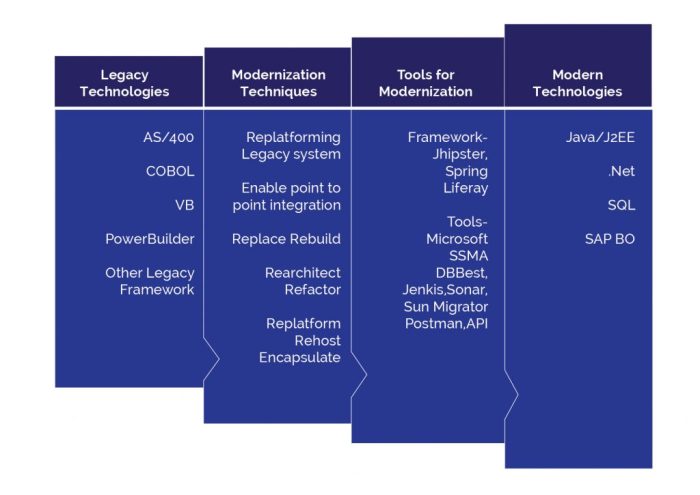
Before upgrading your legacy AT&T Digital Life equipment, it is crucial to check compatibility with the new systems to ensure a smooth transition.
Ensuring compatibility is important because it helps prevent any issues or malfunctions that may arise when trying to integrate outdated equipment with new technology. By conducting a compatibility check, you can identify any potential problems beforehand and take the necessary steps to address them.
Guide on Compatibility Check
- Review the specifications: Check the specifications of your existing equipment and compare them with the requirements of the new system. Look for any discrepancies or incompatible features.
- Consult the manufacturer: Reach out to the manufacturer or customer support to confirm compatibility and seek guidance on how to proceed with the upgrade.
- Test integration: If possible, test the integration of the legacy equipment with the new system to see if they work together seamlessly. This can help identify any compatibility issues in real-time.
Potential Issues
- Outdated technology: Legacy equipment may use outdated technology that is no longer supported by newer systems, leading to compatibility issues.
- Connectivity problems: Incompatibility between devices can result in connectivity problems, affecting the overall functionality of the system.
- Lack of updates: Older equipment may not receive software updates or patches, making it incompatible with the latest technology advancements.
Steps to Upgrade from Legacy AT&T Digital Life Equipment
To upgrade your legacy AT&T Digital Life equipment, follow these step-by-step instructions to ensure a smooth transition to the new devices.
Removing Old Devices
- Begin by disarming your current AT&T Digital Life system to prevent any alarms or alerts.
- Locate the control panel and power it down by unplugging it from the power source.
- Remove any sensors, cameras, or other devices connected to the system from their mounting locations.
- Unpair these devices from the control panel by following the manufacturer's instructions.
- Properly dispose of any old devices according to local regulations and recycling guidelines.
Installing New Devices
- Ensure that your new AT&T Digital Life equipment is compatible with your existing setup by performing a compatibility check.
- Follow the manufacturer's instructions to install each new device, including sensors, cameras, and the control panel.
- Pair the new devices with the control panel according to the provided guidelines to establish a secure connection.
- Test each device after installation to verify that it is functioning correctly and communicating with the control panel.
- Securely mount each device in its designated location to ensure optimal performance and coverage.
Additional Tools or Equipment
- Depending on the type of devices being installed, you may need tools such as a screwdriver, drill, or ladder for mounting.
- Ensure you have access to a stable Wi-Fi connection during the installation process to facilitate device pairing.
- Keep the manufacturer's contact information handy in case you encounter any difficulties during the upgrade process.
Troubleshooting Common Issues
When upgrading from Legacy AT&T Digital Life Equipment, users may encounter some common issues that can hinder the process. It is important to be aware of these potential problems and know how to troubleshoot them effectively to ensure a smooth transition to the upgraded equipment.
Wi-Fi Connectivity Problems
If you are experiencing Wi-Fi connectivity issues after upgrading your AT&T Digital Life Equipment, try the following solutions:
- Check the Wi-Fi settings on your new equipment to ensure it is properly connected to your network.
- Restart your router and modem to refresh the connection.
- Move the equipment closer to the router to improve signal strength.
Compatibility Errors
In case you encounter compatibility errors during the upgrade process, follow these steps to resolve them:
- Double-check the compatibility of your existing devices with the new equipment.
- Contact customer support for assistance in identifying and resolving compatibility issues.
- Consider upgrading any outdated devices that may not be compatible with the new equipment.
System Configuration Problems
If you are facing system configuration problems while upgrading, consider the following tips:
- Ensure that all devices are properly configured and synced with the new equipment.
- Reset the system settings and start the configuration process from scratch if necessary.
- Refer to the user manual or online guides for step-by-step instructions on configuring the new equipment.
Conclusion
In conclusion, upgrading from legacy AT&T Digital Life equipment is a crucial step towards enhancing your home security system. By following the Artikeld steps and being prepared for potential challenges, you can seamlessly transition to upgraded equipment for a more efficient and secure experience.
Popular Questions
How can I ensure compatibility before upgrading?
Perform a compatibility check by following the guide provided and ensure that all existing legacy equipment is compatible with the new systems.
What are some common issues during the upgrade process?
Common issues include connectivity problems, device recognition issues, and software compatibility issues. Refer to the troubleshooting section for solutions.
Do I need any additional tools for the upgrade process?
Depending on the specific equipment being upgraded, you may need basic tools such as screwdrivers, power drills, or specific installation kits.