

Exploring the efficiency of Altium Auto Route in saving design time opens up a world of possibilities for engineers. This essential tool streamlines the PCB design process, providing automation and intelligent features that enhance productivity. Let's delve into how Altium Auto Route revolutionizes the way engineers work and optimizes their design workflow.
Introduction to Altium Auto Route
Altium Auto Route is a feature in Altium Designer software that plays a crucial role in PCB design by automating the routing process. This tool significantly reduces the manual effort required to create PCB layouts, allowing engineers to save valuable design time and focus on other critical aspects of the project.
Significance of Altium Auto Route
- Automates Routing Process: Altium Auto Route automates the intricate process of routing connections between components on a PCB, eliminating the need for manual routing.
- Efficiency and Accuracy: By using advanced algorithms, Altium Auto Route ensures efficient and accurate routing, minimizing the risk of errors in the design.
- Time-Saving: One of the key benefits of Altium Auto Route is the significant time savings it offers engineers, allowing them to complete designs faster and meet project deadlines effectively.
- Optimization: The tool optimizes the routing paths on the PCB, considering factors such as signal integrity, length matching, and impedance control to enhance the overall performance of the design.
Key Features of Altium Auto Route
Altium Auto Route offers several key features that help engineers optimize design time by efficiently routing traces, vias, and other components. The intelligent algorithms of Altium Auto Route contribute to faster design completion, making it a valuable tool for PCB design.
Efficient Routing of Traces
- Automated trace routing capabilities reduce the manual effort required to route traces, saving time and improving overall efficiency.
- Advanced routing algorithms ensure optimal trace paths are selected, minimizing signal integrity issues and reducing the need for redesign.
- Interactive routing features allow engineers to easily adjust trace paths and connections as needed, streamlining the design process.
Efficient Routing of Vias and Components
- Altium Auto Route intelligently places vias and components to optimize signal integrity and minimize signal interference.
- Automated component placement features help ensure efficient use of board space and reduce the risk of routing congestion.
- Interactive editing tools enable engineers to fine-tune via and component placement for optimal performance and manufacturability.
Intelligent Algorithms for Faster Design Completion
- Altium Auto Route utilizes advanced algorithms to analyze design constraints and requirements, automatically generating optimized routing solutions.
- Real-time design rule checks help prevent errors and ensure compliance with design specifications, reducing the need for manual verification.
- Automatic net connectivity detection speeds up the routing process by automatically identifying connections between components and ensuring proper signal paths.
Comparison with Manual Routing
Using Altium Auto Route can significantly save time compared to manual routing methods. The automated process of Altium Auto Route allows engineers to quickly complete routing tasks, eliminating the need for manual tracing and adjustment of individual paths.Altium Auto Route offers a high level of accuracy and reliability in routing PCB designs.
The software considers design rules, signal integrity, and other constraints to optimize the routing process efficiently. This ensures that the final layout meets all requirements and specifications without errors or signal interference.
Time-Saving Benefits
- Altium Auto Route can complete routing tasks in a fraction of the time it would take to manually route a PCB design.
- The software automatically adjusts routes based on design constraints, reducing the need for manual adjustments and corrections.
- Engineers can focus on other aspects of the design process while Altium Auto Route efficiently handles the routing tasks.
Accuracy and Reliability
- Altium Auto Route ensures consistent routing quality by following design rules and constraints set by the engineer.
- The software minimizes the risk of human error in routing, leading to more reliable PCB layouts.
- Altium Auto Route provides a detailed visualization of the routing paths, allowing engineers to verify the accuracy of the design before finalizing it.
Scenarios of Efficiency
- In complex PCB designs with dense components, Altium Auto Route can efficiently navigate through tight spaces and obstacles, saving time compared to manual routing.
- When dealing with high-speed signals that require precise routing, Altium Auto Route can optimize signal paths quickly and accurately, ensuring signal integrity without the need for manual adjustments.
- For iterative design processes that involve frequent changes and updates, Altium Auto Route can adapt to modifications rapidly, reducing design time significantly.
Best Practices for Utilizing Altium Auto Route
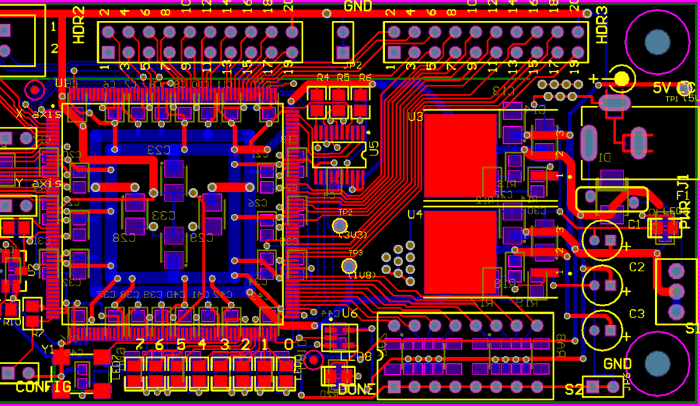
When using Altium Auto Route, there are several best practices that engineers can follow to maximize the benefits of this feature and save design time effectively.
Setting Up Constraints and Parameters
One key strategy for optimizing Altium Auto Route is to set up constraints and parameters effectively. By defining clear rules and limitations, you can guide the routing process to align with your design requirements.
- Establish clear signal integrity constraints to ensure proper signal propagation.
- Define routing topologies and layer assignments to streamline the routing process.
- Utilize design rules to enforce spacing, length matching, and other critical parameters.
Tips and Tricks for Maximizing Efficiency
In addition to setting up constraints, there are several tips and tricks that can help engineers save time and achieve optimal routing results with Altium Auto Route.
- Start with a clean and organized schematic to facilitate the routing process.
- Use the interactive routing feature to manually guide the auto router in complex areas.
- Regularly review and optimize design rules to adapt to changing project requirements.
Troubleshooting Common Issues
Despite its efficiency, engineers may encounter challenges when using Altium Auto Route. Understanding common issues and how to troubleshoot them can help maintain design productivity.
- Address clearance violations by adjusting design rules and constraints.
- Manually route critical nets that require specific routing paths or considerations.
- Optimize layer stackup and routing strategies to minimize signal integrity issues.
Final Thoughts
In conclusion, Altium Auto Route stands out as a game-changer for engineers seeking to save valuable design time. By leveraging its innovative features and capabilities, professionals can elevate their design processes and achieve faster, more accurate results. Embrace the power of Altium Auto Route to unlock new levels of efficiency and productivity in your engineering projects.
Q&A
How does Altium Auto Route automate the routing process?
Altium Auto Route uses intelligent algorithms to automatically route traces, vias, and components, saving engineers time and effort.
What are the benefits of using Altium Auto Route for engineers?
Altium Auto Route helps engineers save design time by optimizing routing, improving efficiency, and accelerating the design completion process.
Can Altium Auto Route outperform manual routing methods?
Yes, Altium Auto Route's accuracy and reliability surpass manual routing, especially in scenarios where speed and efficiency are crucial.
How can engineers troubleshoot common issues when using Altium Auto Route?
Engineers can troubleshoot issues by reviewing constraints, parameters, and adjusting settings in Altium Auto Route to optimize performance and resolve challenges.